Reducing support calls with a guided chatbot
SnappTrip
Overview
SnappTrip is a full-service online travel booking platform that processes millions of tickets each month. By 2026, rising support costs had become a critical operational concern.
Main Problem: SnappTrip had a high volume of repetitive customer support requests, but users struggled to find answers within the app due to poor discoverability and multi-step navigation, leading them to rely on call center agents. This caused high operational costs, long wait times, low customer satisfaction, and overloaded support teams, prompting the need for an chatbot to automate common queries.
This resulted in:
- High support costs
- Long waiting times
- Low customer satisfaction
- Heavy workload for customer support agents
Role
User research
User experience design
User interface design
Tools
Figma, FigJam, Claude Design, ChatGPT
Team
- Lead Product Designer (me)
- 1 Product Manager
- UX Researcher
- Engineering (4×), QA (2×)
Business requirements
- Reduce support calls per ticket by 30%
- Achieve 60% self-service resolution
- Reduce average handling time by 40%
- Increase CSAT above 4.5/5
- Keep human escalation below 25%
Discover user problems
Through customer support analysis and journey mapping, I identified several recurring issues.
Users struggled to:
- Find cancellation instructions
- Understand refund rules
- Track reservation status
- Know whether their ticket could still be cancelled
- Understand cancellation penalties
- Find the correct support section
- Wait for human agents for simple questions
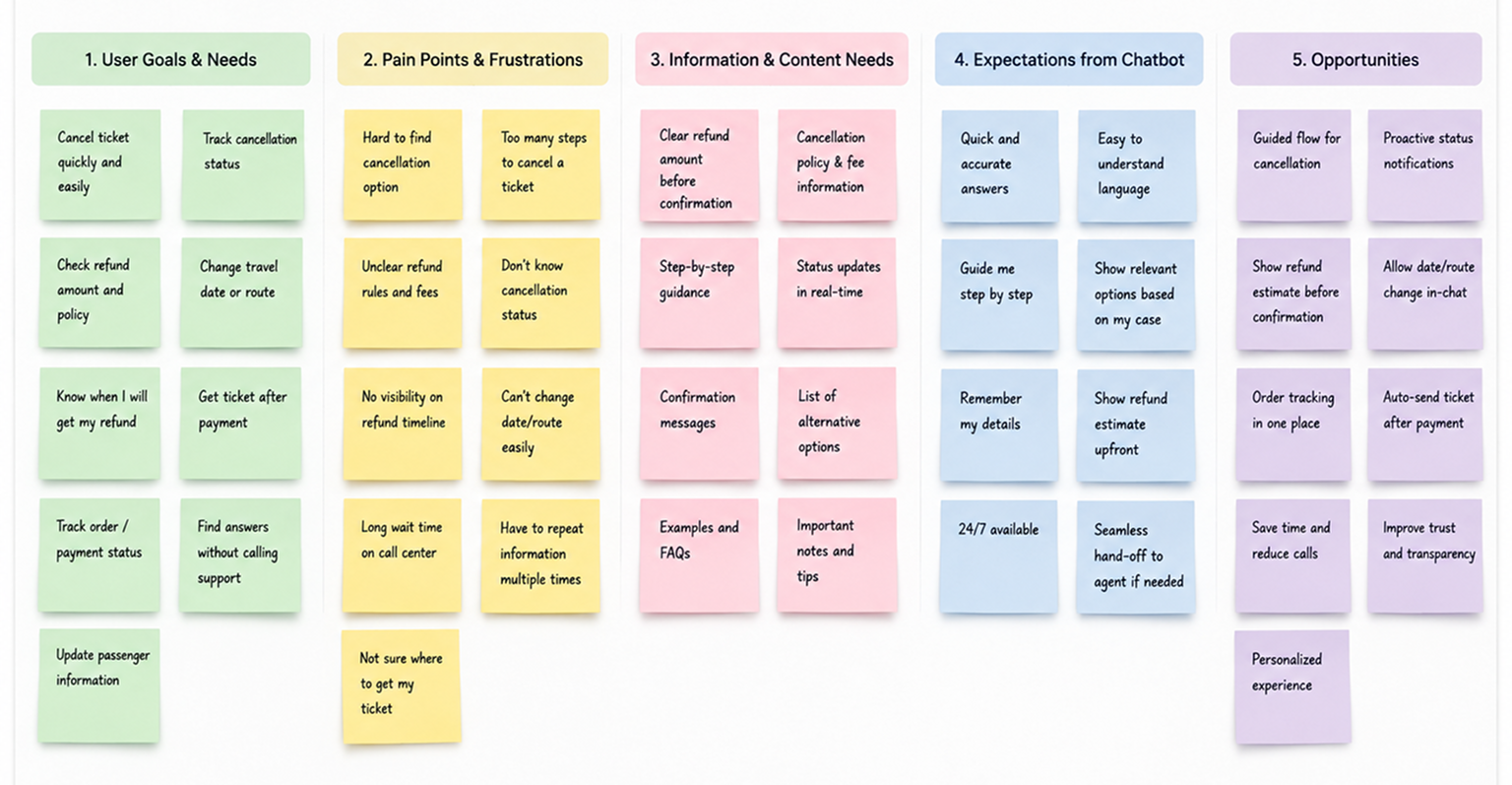
Research insights
To understand why users preferred contacting customer support, I combined qualitative and quantitative research.
- Reviewed customer support conversations
- Analyzed cancellation and reservation-related tickets
- Conducted user interviews
- Mapped the end-to-end support journey
- Performed competitive benchmarking
1. Users wanted the fastest path, not more information.
Most participants already knew they wanted to cancel or check their reservation—they simply couldn’t find where to do it.
“I know what I need. I just don’t know where to start.”
Design Opportunity
Surface the most common intents immediately.
Reduce navigation before users can take action
2. Users wanted the fastest path, not more information.
Before confirming a cancellation, users wanted to understand:
- How much money they would receive.
- When they would receive it.
- Whether any penalties applied.
Many contacted support simply for reassurance.
Design Opportunity
Display refund estimates before confirmation.
Explain cancellation policies in plain language.
Set clear expectations for refund timing.
3. Reservation status created unnecessary support contacts.
Many users contacted support even though their reservation was still processing normally.
The biggest uncertainty was:
- Is my reservation confirmed?
- Should I wait?
- Is something wrong?
Design Opportunity
Provide proactive status updates with contextual explanations and recommended next steps.
4. Users preferred guided conversations over searching.
Participants found it easier to answer a few simple questions than browse multiple Help Center articles.
Rather than searching, users expected the product to guide them.
Design Opportunity
Design a conversational flow that asks one question at a time and progressively narrows down the user’s intent.
Competitors approach
I benchmarked customer support experiences from transportation and travel platforms.
Key findings
- Most chatbots relied on rigid decision trees.
- Users became frustrated when they couldn’t explain their issue naturally.
- Few systems remembered conversation context.
- Escalation to human support often happened too late.
User flow
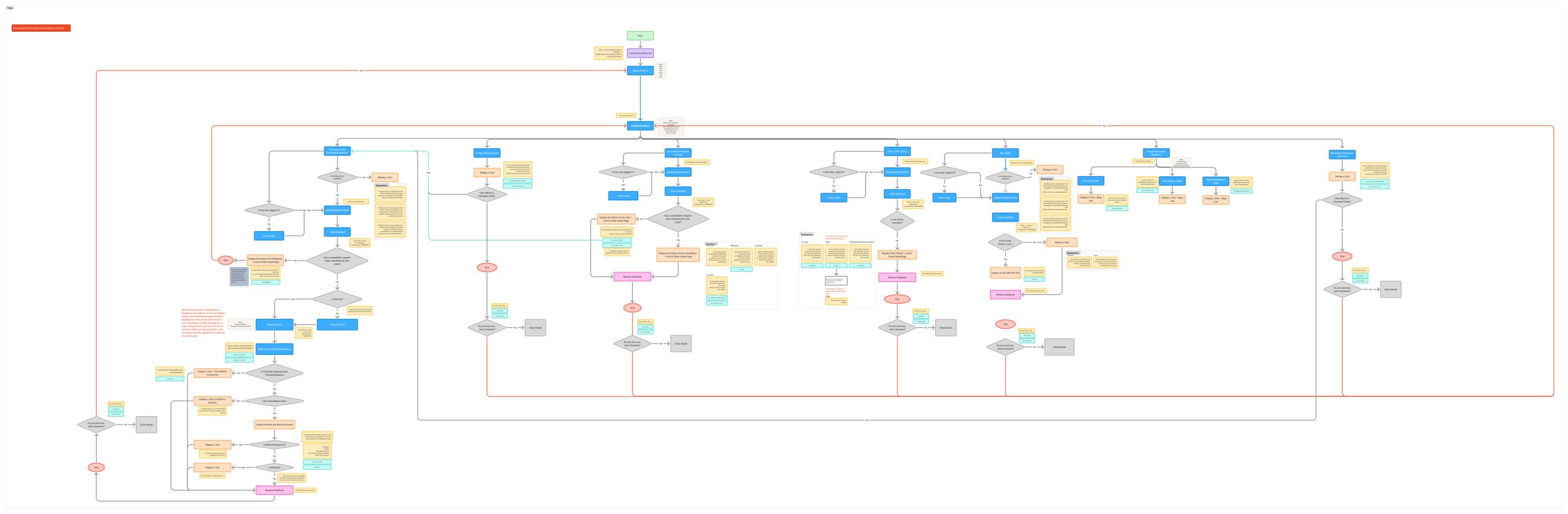
The chatbot centralizes the most common railway support requests into a single conversational experience. Users can easily complete tasks such as Fine Inquiry & Cancellation Registration, Change Date & Route, Cancellation Request Tracking, Order Status Tracking, Get Ticket, Passenger Information Correction, and Frequently Asked Questions. By understanding user intent and guiding them through the appropriate flow, the chatbot reduces friction, minimizes unnecessary support calls, and enables faster self-service.
Solutions I explored
I designed and evaluated 2 conversation models.
Version 1
FAQ chatbot
Result
- Fast to build
- Low task completion
Version 2
Menu-based chatbot
Result
- Reduced confusion
- Too many navigation steps
Final Solution
Intent-based chatbot
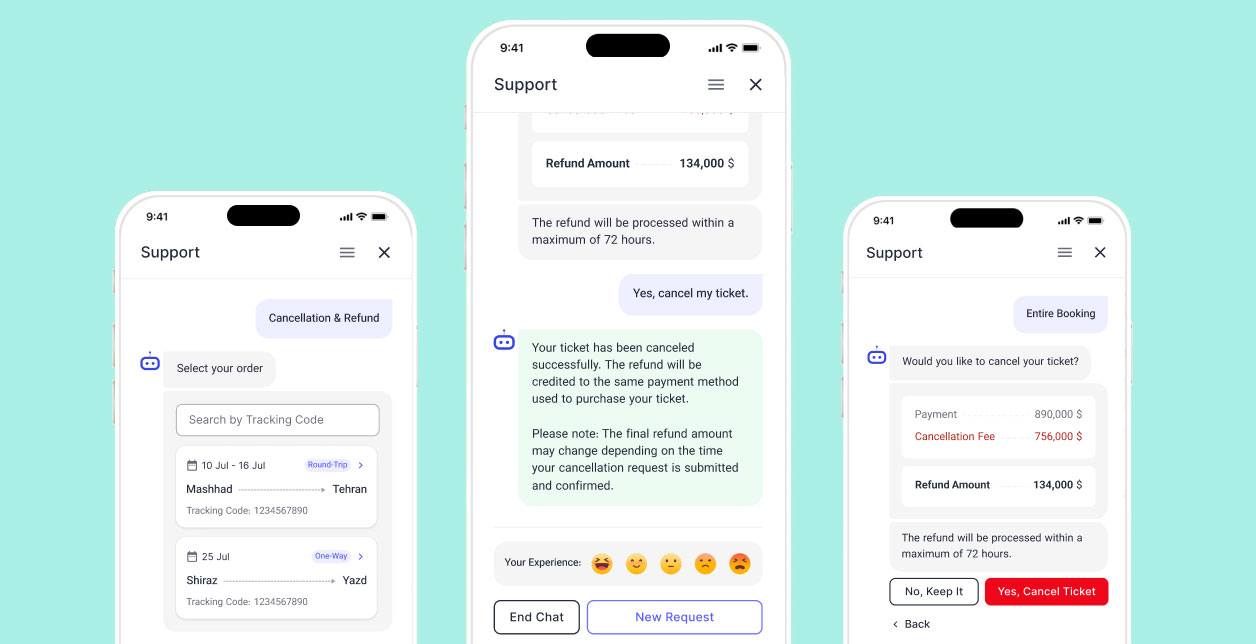
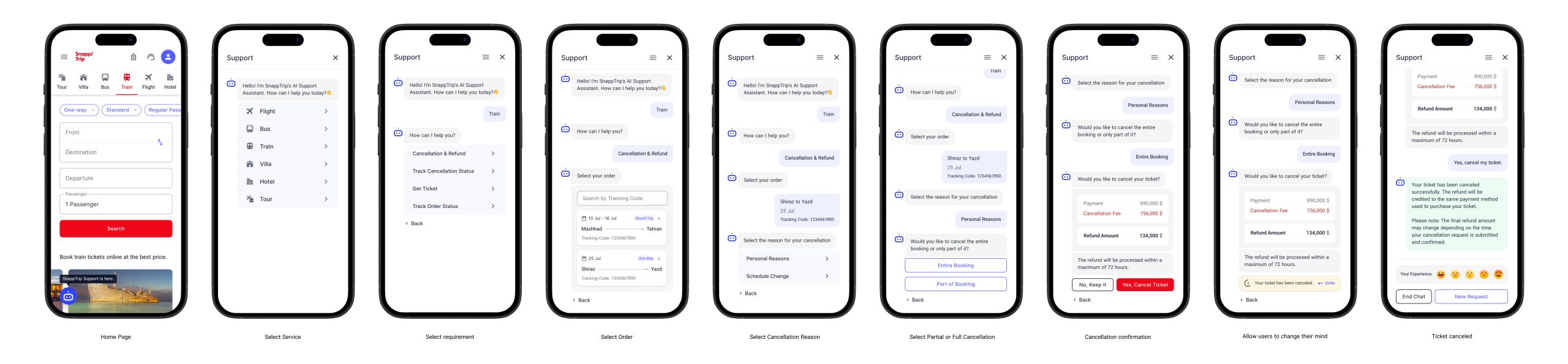
The cancelation ticket flow:
- Detects user intent
- Retrieves ticket
- Identifies cancellation reason
- Determines cancellation type
- Calculates estimated refund
- Explains cancellation policy
- Confirms cancellation
- Processes cancellation
- Shows refund timeline
Designs
Train cancellation flow
Check usability issues
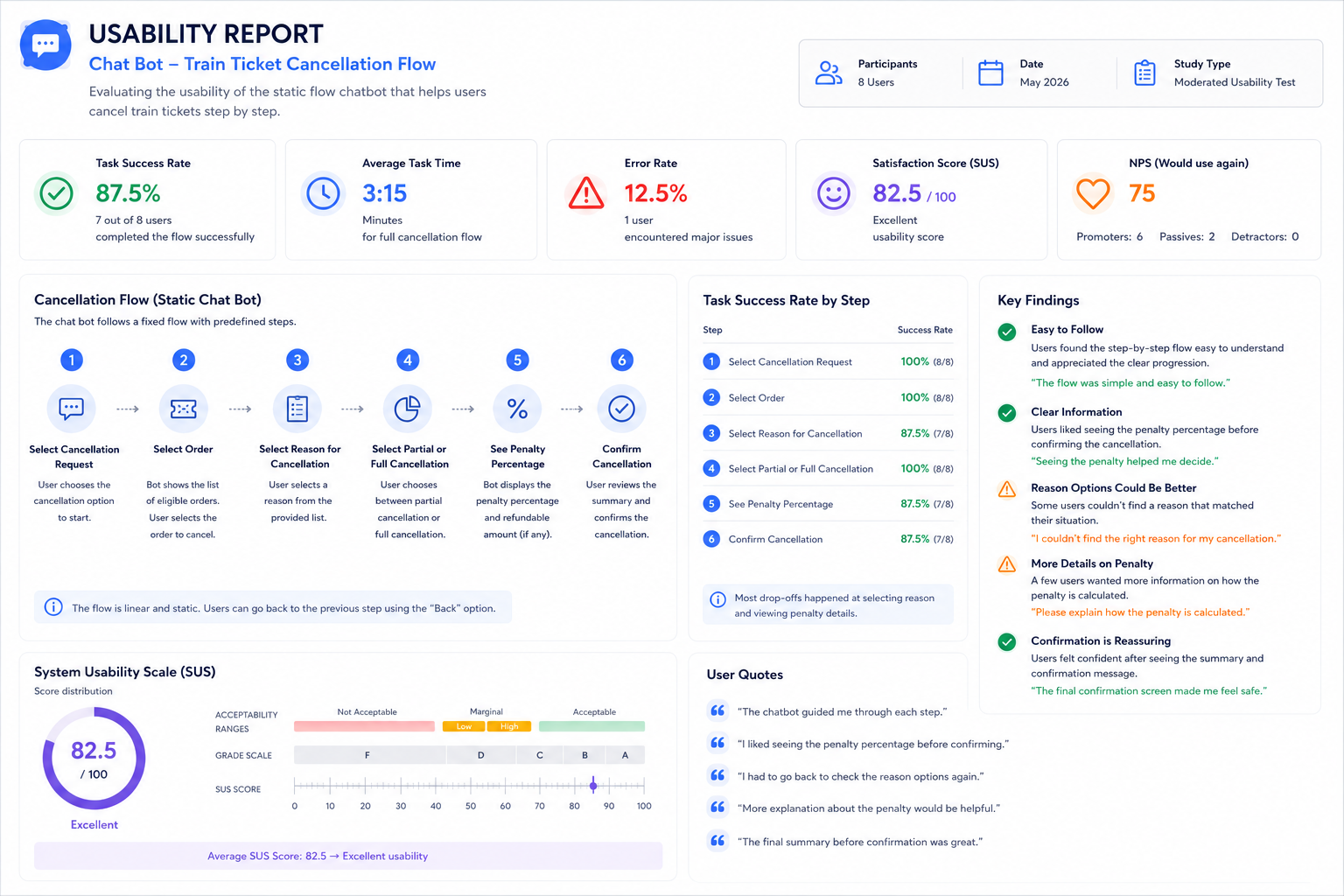
To validate the guided chatbot experience, I conducted usability testing on an interactive prototype. Instead of allowing free-text conversations, the chatbot guided users through a structured question-and-answer flow using predefined options and contextual actions.
The evaluation focused on whether users could complete their tasks without confusion or human assistance.
Key observations:
- Users quickly understood the step-by-step conversation pattern and rarely expected a traditional chat interface.
- Contextual quick actions reduced typing effort and helped users progress with confidence.
- Displaying refund details before confirmation increased trust during the cancellation process.
- Some users were unsure about their current progress, leading to the addition of a conversation progress indicator.
- Participants preferred short, focused questions over long informational messages.
- Simplified decision paths by reducing unnecessary questions.
- Replaced long messages with concise prompts.
- Added progress indicators to improve orientation.
- Improved the visibility of primary actions.
- Refined the conversation flow to minimize cognitive load while keeping users in control.
The final guided experience enabled users to complete common support tasks without relying on free-text input, creating a faster and more predictable self-service journey.
Report
AI Throughout My Design Process
AI accelerated every stage of the design process.
Research
- Benchmarked 12+ chatbot experiences
- Summarized hundreds of support conversations
- Identified UX patterns
Analysis
- Clustered user pain points
- Generated opportunity maps
- Prioritized improvements
Ideation
- Explored 20+ conversation flows
- Generated alternative interaction models
- Evaluated edge cases
Prototyping
- Built interactive HTML prototypes
- Generated UI variations
- Iterated designs in hours instead of days
Motion Design
- Created chatbot animations
- Produced presentation-ready interactions
- Generated micro-interaction concepts
Using AI reduced research and production time by approximately 50%, allowing me to spend more time on strategic UX decisions, validating conversation flows, and refining the overall user experience.
What I Learned
This project reinforced that designing AI support experiences isn’t about creating an open chat—it’s about designing a guided journey that helps users complete their tasks with confidence.
Key Takeaways
A structured question-and-answer flow reduces cognitive load by guiding users one step at a time instead of requiring them to formulate requests.
Presenting only the relevant options at each stage creates a faster and more predictable self-service experience.
Displaying contextual information—such as refund estimates, reservation status, or ticket details—before asking for confirmation increases user confidence and reduces hesitation.
Restricting interactions to guided choices minimizes user errors and simplifies complex support processes without sacrificing flexibility.
AI significantly accelerated my design process, helping me with benchmarking, research synthesis, ideation, conversation flow generation, rapid prototyping, HTML implementation, and motion design. This allowed me to spend more time validating the experience and refining the decision flow rather than repetitive production tasks.
Overall, I learned that the most effective AI support experience isn’t necessarily one that allows users to chat freely, but one that guides them to the right outcome with the fewest possible decisions.
Next